 Shahria Emon
Most spec-driven development tutorials build a toy, like an expense tracker in 30 minutes. That proves the idea, not that it holds up in production.
This is spec-driven development on a real project. I rebuilt the core of Scrumo, the project management app Core Devs runs on, from an empty repository. The spec had 237 requirements. The core was working in seven days, the project that took 20 to 40 seconds to load in version one now loads in under a second, and the team has used it every working day since. Here is the pipeline, including the parts that went wrong.
Dashboard, nested tasks, kanban, calendar, timeline, task drawer, notes, workload and reports.
Walkthrough of the real interface with demo data. 24 seconds, no sound.
What is spec-driven development?
Spec-driven development means writing and freezing the requirements before any code exists, then building against that written spec instead of chat history or memory. With AI coding tools, the spec becomes the contract both you and the model are held to. If they disagree, fix the code, or change the spec on purpose and write it down.
The part tutorials skip is what happens after the spec. A spec alone does not ship software. The build order, the verification gates and how you handle change matter as much.
Why version one had to go
Scrumo v1 proved the concept: a Scrum tool shaped around how Core Devs actually delivers. Tasks needed deep nesting, and every parent needed live rolled-up numbers: estimated time from its children, actual time from timers and manual logs, story points and completion.
Every edit anywhere in a task tree had to update every number above it. As data grew, that recalculation got heavier, and deep nesting slowed exactly the screens a PM lives in. On a project with 50 tasks and 100 nested subtasks, v1 took 20 to 40 seconds to load, and slowed again every time you expanded a task.
The rollup logic was bound to the original architecture. That is not something you patch. So I started over, with the rollup engine at the center.
Step 1: Write the spec, then guard it
The SRS came out of the internal pipeline we run at Core Devs on Claude, in stages: a discovery pass, an AI-generated draft, a review pass, then my own edits. The version we froze, V3.0, had 237 numbered requirements: 196 for the MVP and 41 tagged for Phase 2. It took about two days and three major revisions, and it was locked at the first commit on April 6.
The AI wrote most of the volume: requirement wording, acceptance criteria, edge cases and the cross-references between them. I made the decisions that depend on the business, not the text:
- Multi-tenancy. All companies share one database, and PostgreSQL row-level security keeps each company's data separate. I chose that over a schema per company because migrations and connection pooling stay simple past 50 tenants.
- Scope cuts. List view became the only MVP task view. Kanban, Table, formula custom fields and email and push notifications moved later.
- Hard limits. Subtasks nest up to 10 levels, and the rollup performance target is only guaranteed within that limit.
- The first milestone. A fully coded prototype of every screen, not mockups.
A lot changed after the freeze, and that is normal. What matters is that every change became a written scope amendment instead of a quiet edit. Real-time push went to polling at our users' request, then came back later on server-sent events. Open self-registration became invite-only, because in a multi-tenant app a shared approval queue let one company's admin approve signups meant for another. Calendar and Gantt views were explicitly out of scope, and both shipped later as new milestones.
The biggest lesson: the spec had a design milestone and backend milestones, but no milestone for connecting the two. Five milestones in, the frontend was still running on mock data. We added an integration milestone, and every spec I have written since has an explicit integration step.
Step 2: Design as working code, not mockups
By April 9, all 23 screens existed as a working React 19 and Tailwind prototype and were signed off. Real screens you could click through, not design frames. Auth and the multi-tenant core passed user acceptance testing the same day.
A coded prototype answers questions a mockup can't, like how a deeply nested task list actually feels to scroll. And what gets approved is the real thing.
Step 3: Build the hardest module first
This is the decision that made the week possible. In v1, the rollup logic grew on top of features that already existed. In v2, the rollup engine shipped on April 10, before the features that depend on it.
It works because of two rules:
- One canonical rollup service, on the server. Every write that can affect a tree, from the UI, a bulk operation, a timer or an API call, flows through the same recalculation path inside one transaction. The frontend never computes a rollup. It only renders what the server resolved.
- Display values never drift from source data. When someone corrects a task's actual time, the engine reconciles the underlying time entries in the same transaction, so the timesheet and the task can never disagree.
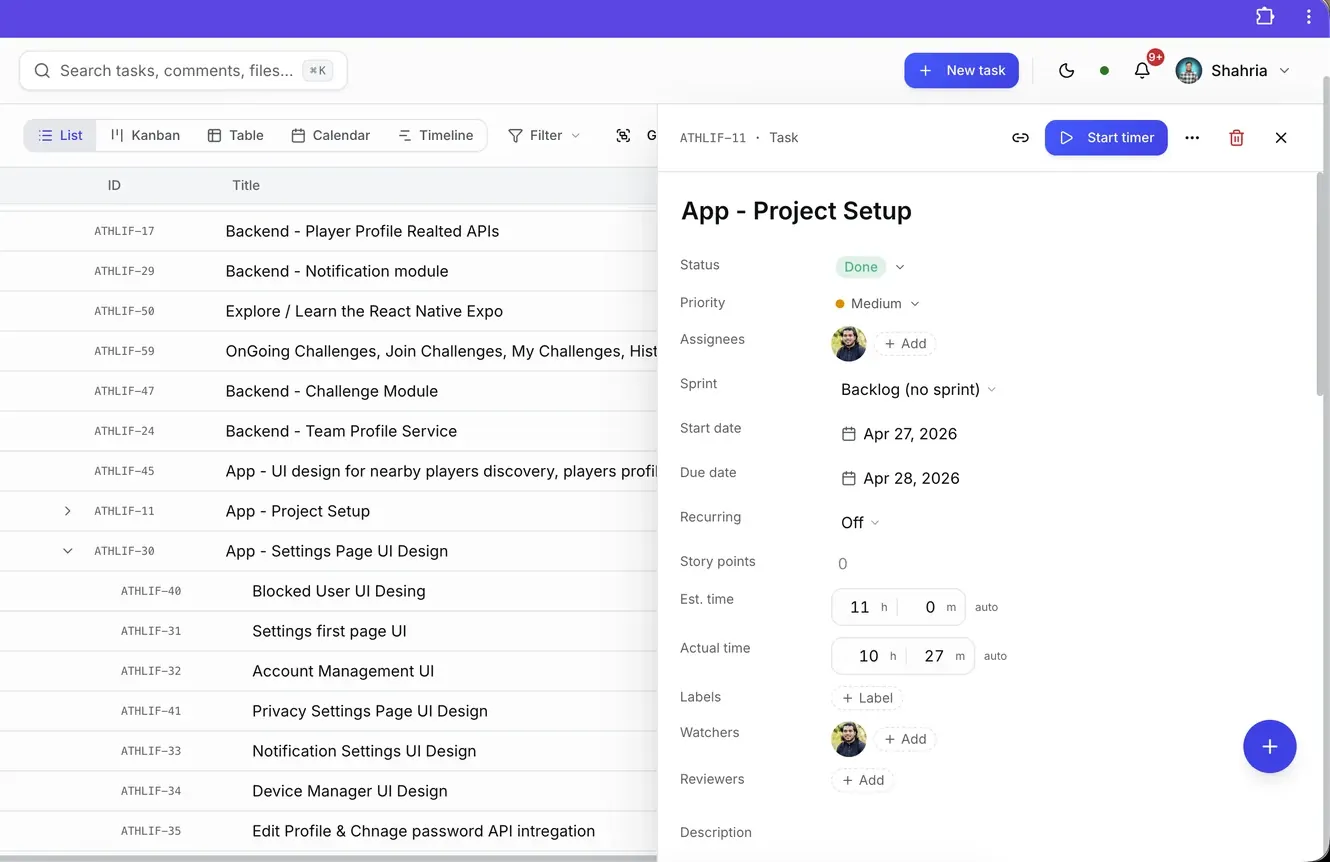
Every derived number has exactly one implementation, pinned by an integration test suite. Build the easy parts first, and the hard module ends up bolted on at the end, shaped by decisions made before you understood it. That is what happened to v1.
Step 4: Test every milestone against the live stack
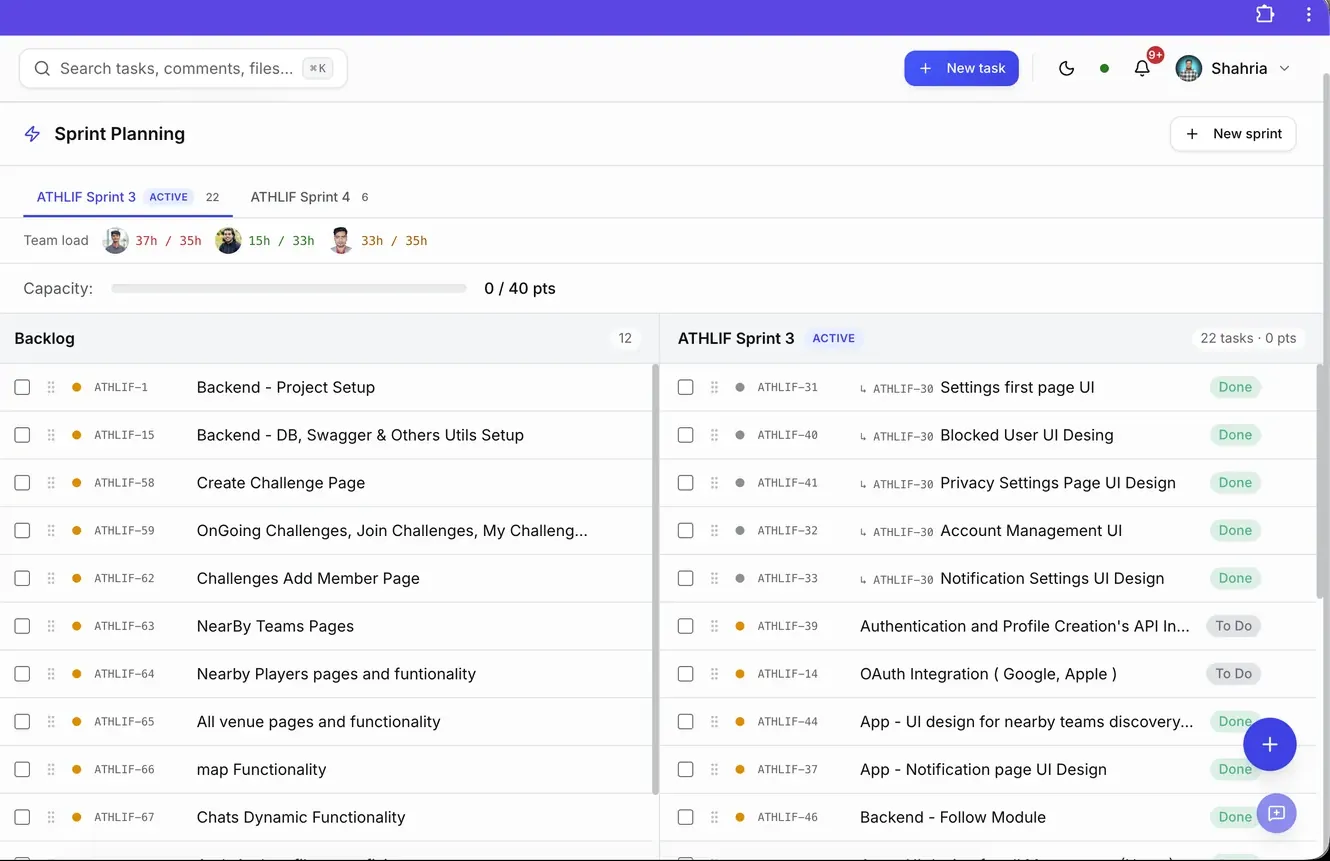
Each milestone came with user acceptance test scripts that open real browsers with Puppeteer and run against the real stack, not mocks. Files, comments, notifications and reporting followed the core, and the first internal demo was on April 15. The team started planning real sprints in it that week and never went back.
Step 5: Root-cause every bug, and guard the boundary
Every bug fix lands with a written root-cause analysis and a durable rule, so the same class of bug can't ship twice. One bug taught me the most important version of that rule.
Personal notes kept getting wiped: a user opened a note and its body was saved as empty. It happened six times over a few weeks, each time from a different client-side cause. The clearest one came from real-time collaboration. The editor started empty while it waited for its sync handshake, reported that empty state as a change, and our 800 ms auto-save wrote an empty body over the real note.
We fixed that race. Then a fallback editor that ran before the connection finished did the same thing. Then a stale browser tab saving on close. Six client-side fixes in three weeks didn't close the problem. One server-side rule did: the API now refuses any save that would replace a non-empty note with an empty one, unless the request explicitly says it means to clear it. We added per-save version history, backups every four hours, and a watchdog that alerts us if a backup goes missing.
The rule: if a bug keeps losing data through different code paths, stop fixing the paths and put a guard at the boundary. The server has to refuse destructive overwrites the user couldn't have intended, whatever the current client bug is.
What the AI did, and where I overruled it
My tools: Claude for the SRS, proposals and client documents through the Core Devs pipeline. Claude Code for design, implementation, tests and audits. Puppeteer for end-to-end UAT. Sentry for production errors.
AI gave the biggest speed-up on volume work that is easy to check: design documents for each milestone, test suites with hundreds of passing tests, the OAuth 2.1 server and the MCP integration, and independent audit passes where a fresh agent with no prior context reviews only the new code. For a solo developer, that is the difference between shipping a milestone in days and in weeks.
I overruled it in three kinds of places:
- Audit findings that sounded right but weren't. One performance audit flagged a database latency cost that hadn't existed since we moved the database onto the same server as the app. Another wanted to change a deduplication window the signed design specified on purpose. I check every finding against the real system before acting on it.
- Confident diagnoses without evidence. Twice the AI trusted an earlier "fixed" note or a single synthetic test over the user's actual broken file. My rule now: get the user's real bytes, open them in their native format, and validate with strict tools. If the same class of bug shows up twice, the first fix was shallow.
- UX taste. It proposed an ambitious calendar redesign and a combined date-range picker. Both were clever, both confused real users, and I reverted both. When a user says something looks off, the answer is usually a smaller fix, not a bigger redesign.
The most important catch didn't come from the AI at all. A live QA pass found one middleware that never checked the organisation ID in the URL against the one in the user's token. It didn't expose another company's data, because the server kept using the token's organisation. But it was a bug class we had already fixed in one controller, and that fix had never spread to later modules. The tests and the audit agent both missed it. AI makes you fast. It doesn't replace someone who distrusts green test results.
What spec-driven development delivered on a real project
- 7 days from empty repository to working core, built solo
- Under 1 second to load the project that took 20 to 40 seconds in v1
- 17 milestones shipped since on the same pipeline
- 3 Core Devs workspaces running delivery in it every day
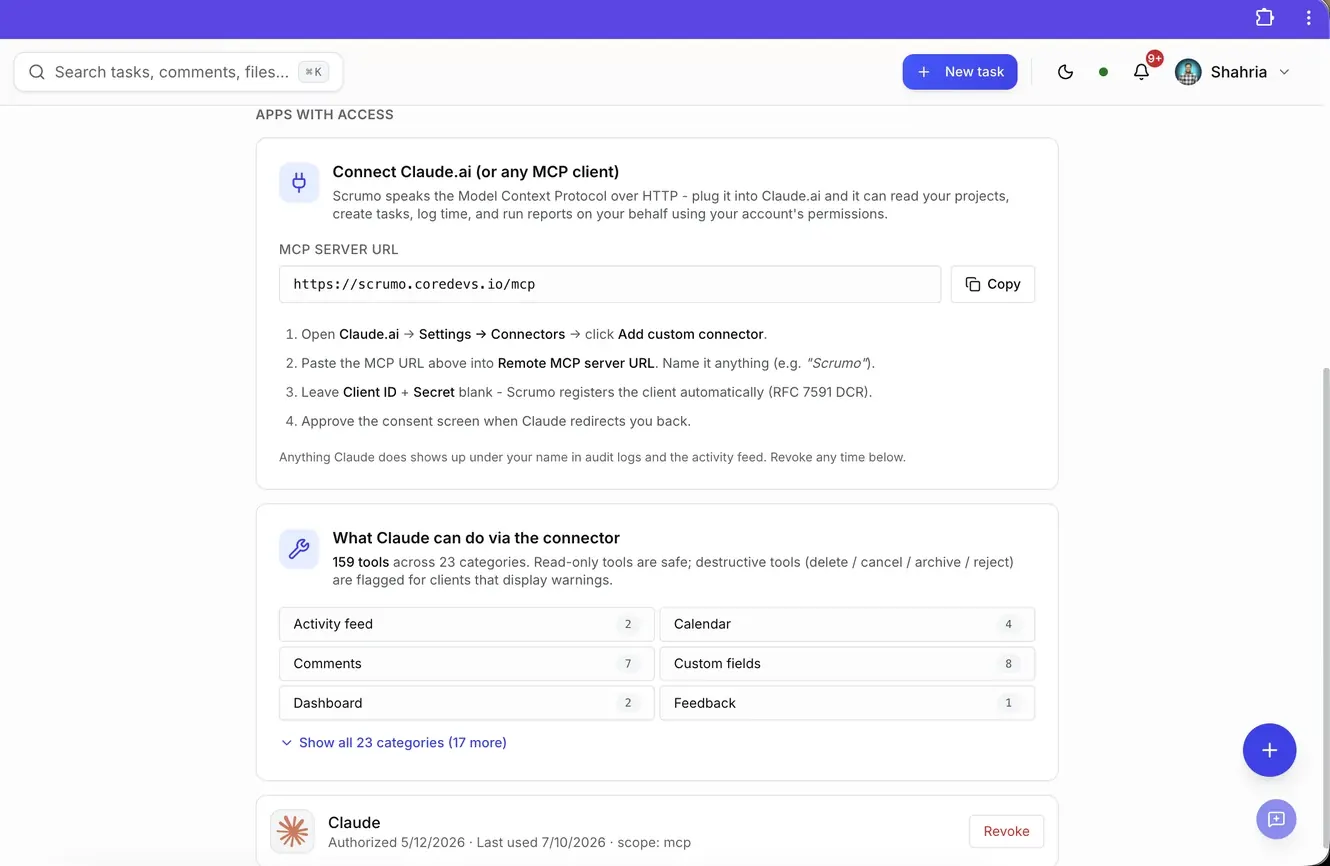
- 159 MCP tools, so Claude can plan sprints, create tasks, log time and run reports directly in Scrumo
The tool my AI workflow built is now a tool my AI workflow uses.
Want this on your project?
If you have a build that needs a stronger core, or an app that slowed down as it grew, message me on WhatsApp. I'll tell you honestly whether it needs a new core or a fix. The full Scrumo case study has the screens and the stack, and if you're inheriting someone else's code, read taking over a software project mid-milestone.