 Shahria Emon
Most guides on how to build an MCP server stop at one tool and a local test. That's the easy 10%. The hard part is everything after: login, permissions, many users and many companies sharing one database, and keeping a hundred tools usable for an AI. Scrumo, the project management app Core Devs runs on, has an MCP server with 169 tools across 23 categories, connected to Claude. Here is what building it taught me.
We build AI first at Core Devs now, and we plan projects with Claude. Typing those plans into a task tool by hand made no sense. With Scrumo connected, Claude creates the work itself, watches how projects and the team are doing, and tells us what it sees.
What is an MCP server?
An MCP server exposes your app's actions as tools that an AI client can call, using the open Model Context Protocol. Claude, and any other MCP client, connects to it with a URL. After the user approves, the AI can read and change data in your app the same way that user could, without any custom integration for each AI client.
Should your MCP server be a separate service?
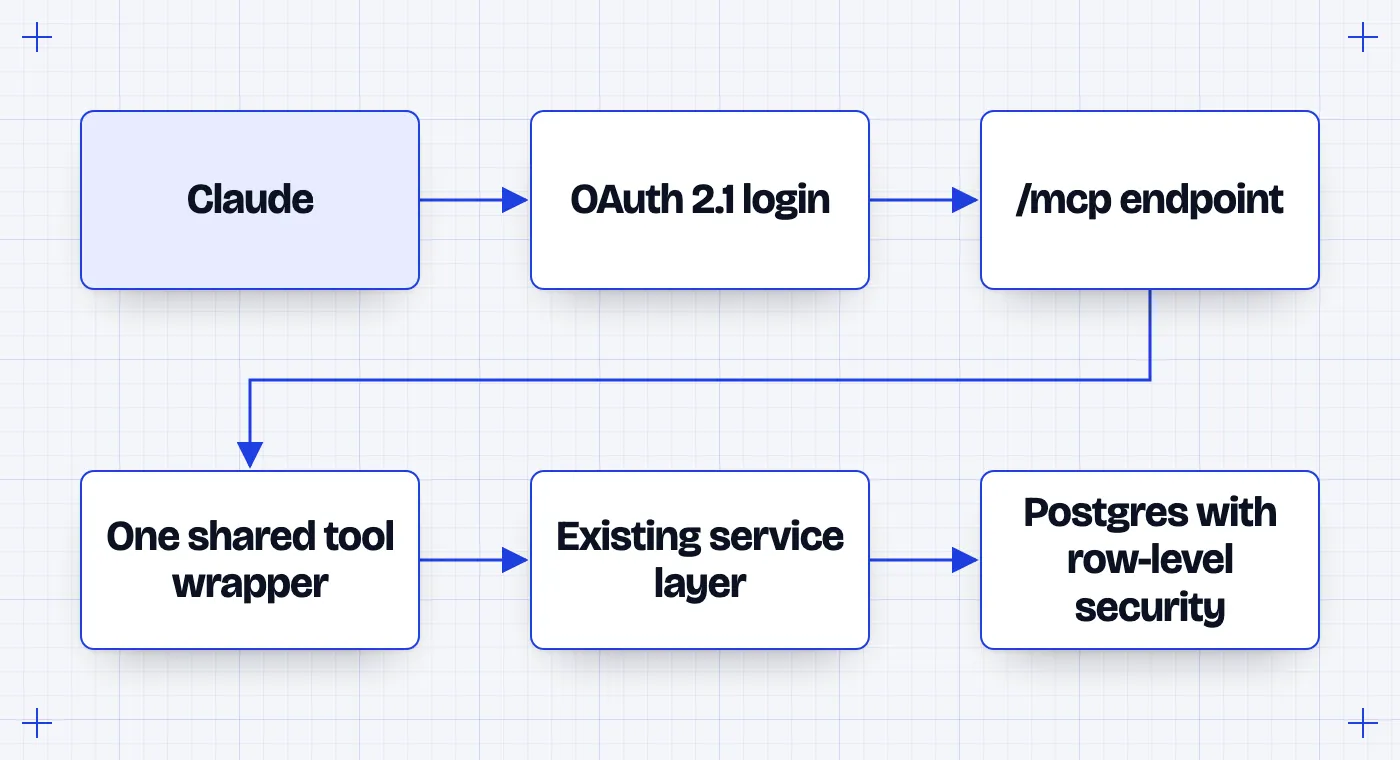
For a product that already has a backend, no. Scrumo's MCP server lives inside the main API, and that one decision avoided most of the bugs a separate service would have created.
- Same rules everywhere. Every tool calls the same service layer the web app uses. Permission checks, activity logs, notifications and live updates behave the same whether a change comes from a person or from Claude.
- Same data protection. The database's row-level security (Postgres RLS) is bound for each call the same way the web app does it. There is no second path into the data that could drift out of sync.
- Cheap tools. A tool is roughly 15 lines: an input schema plus a call into an existing service.
- Nothing extra to run. One deploy, one process, one database, same hostname.
Which transport should a remote MCP server use?
Streamable HTTP, on one endpoint. Scrumo's /mcp endpoint accepts POST, GET and DELETE and is stateless: each request gets a fresh server instance, with no session IDs and no sticky sessions. That means it scales and restarts like any other API route. It has no stdio mode, because it only ever runs as a remote server.
The stack is TypeScript, Node.js, Express and the official MCP TypeScript SDK, with Zod for each tool's input schema.
How do you add login to an MCP server?
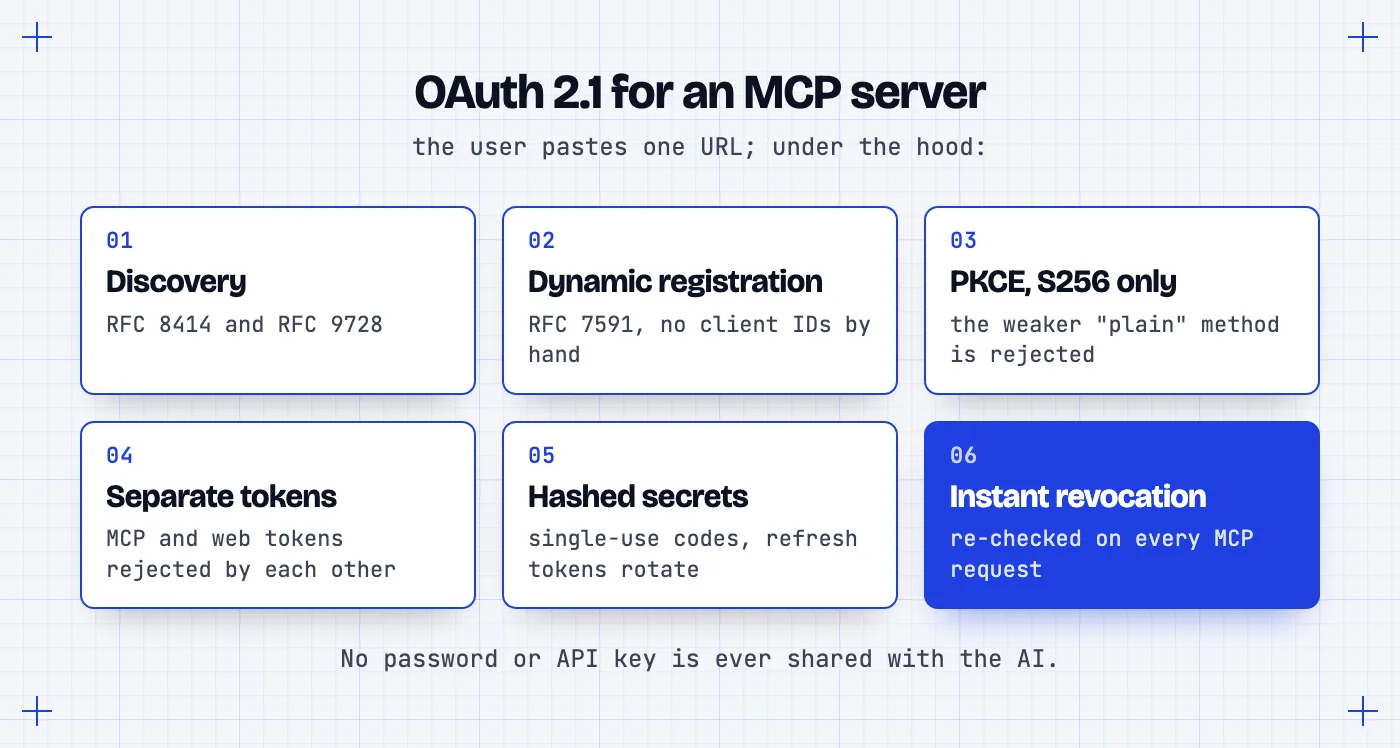
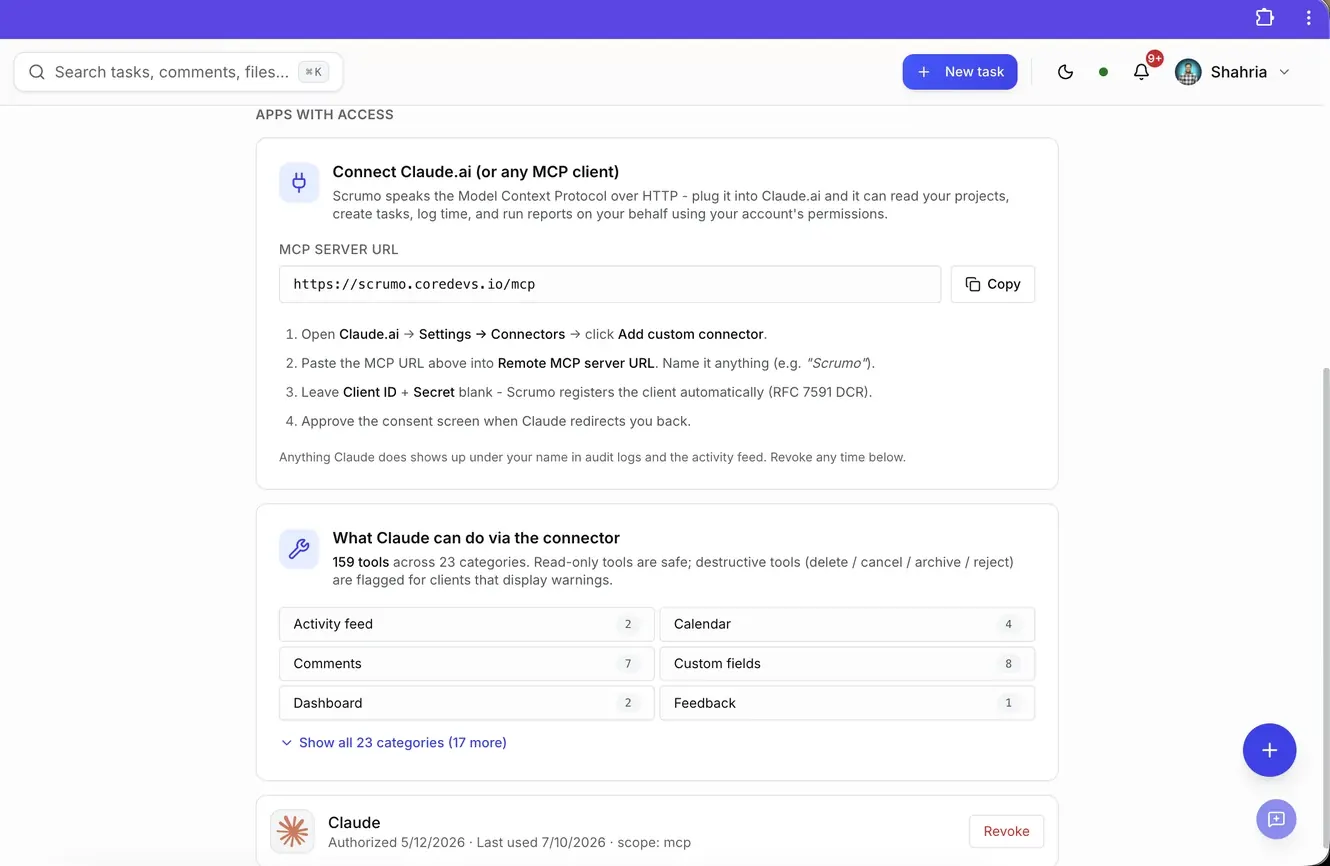
With OAuth 2.1, because that is what the MCP spec and Claude.ai's custom connector dialog expect. Done right, the user pastes one URL, leaves Client ID and Secret blank, and approves on your own consent page.
What that takes under the hood:
- Discovery. The client finds your auth server through standard metadata (RFC 8414 and RFC 9728).
- Dynamic client registration. The client registers itself (RFC 7591). No one hands out client IDs by hand.
- PKCE with S256 only. The weaker "plain" method is rejected.
- Separate tokens. MCP access tokens are bound to the MCP endpoint. The web app rejects them, and the MCP endpoint rejects web tokens.
- Short-lived, hashed secrets. Authorization codes are single-use and stored only as hashes. Refresh tokens are stored as hashes and rotate on every use, so a replayed old one fails.
- Instant revocation. Every MCP request re-checks that the connection is still active. Users see and revoke each connected app from a settings page. No password or API key is ever shared with the AI.
How many tools should an MCP server have?
As many as your users need, as long as each one is small and obvious. Scrumo went from 130 tools on day one to 169 today. What keeps that usable for an AI:
- Many specific tools, not a few "manage everything" tools. Separate tools to create, update and delete a project status, instead of one tool with an action field. The AI picks by name instead of guessing an action string.
- Verb-first names.
list_tasks,get_task,create_subtask,add_task_assignee. Related tools sort together, which matters because Claude.ai lists tools alphabetically, not by category. - Units and examples in descriptions. Time fields say they are in seconds, with examples (1800 is 30 minutes). This came straight from a bug, below.
- One shared wrapper for every tool. It handles login, finding the company the request belongs to, membership checks, data scoping and error formatting. Tool code holds only the operation itself.
- IDs instead of context. A tool takes a project or task ID and the server works out which company it belongs to, so the AI rarely has to pass that itself.
- Limits built in. List tools paginate with a capped page size. A bulk tool applies one action to up to 100 tasks at once.
- Things left out on purpose. File uploads, deleting a whole organization and deactivating users are not exposed to the AI.
What broke when building an MCP server?
Eleven things, and most of them are not in any tutorial.
| What broke | Fix |
|---|---|
| Login redirect dropped the OAuth details, so the consent page came back empty | Keep the full address, including the query string, through the login round trip |
| CORS blocked Claude.ai, because the API only allowed the web app's origin | Strict CORS for the web app, open only for the OAuth and MCP endpoints, which are protected by tokens |
| The popup login could not report back to the page that opened it | Relax the security header that cut the link between the two windows |
| Consent page stuck on "Verifying request..." | The front end unwrapped the API response twice; read it once |
| Claude read a 30-second estimate as 30 minutes | State the unit, with examples, in every time-related tool description |
| Recurring-task fields were rejected | They had never been added to the tool schemas; added to every relevant tool |
| Several bots signed in as one user kept logging each other out | Each login is independent; signing in again replaces only that client's older tokens |
| MCP tokens worked on some web routes | The web login now rejects any token carrying MCP claims |
| Project tools checked company membership but not project membership | The shared wrapper now applies the web app's exact rule, covered by real-database tests |
| Category grouping was invisible in Claude.ai | Verb-first names do the grouping in practice |
| The first live test against Claude.ai ran during an Anthropic outage | Every server-side check passed; re-tested once the outage cleared |
Two of these were security fixes, found and closed before they caused harm. Both came from the same root: two ways into the same data that were not held to the same rules. That is the strongest argument for keeping the MCP server inside your app.
How long does it take to build an MCP server?
The core took about one working day, built solo with Claude Code. The first commit shipped the full OAuth 2.1 server and the MCP endpoint with 130 tools, about 5,300 lines across 46 files. In total, 21 commits over 9 separate days between April and November 2026 grew it to 169 tools and fixed the issues above. 70 automated tests cover the login flow, security rules and the busiest tools, plus an end-to-end script that runs the full OAuth and MCP flow against a live local server.
The speed came from the same spec-first process I used to rebuild Scrumo's core in 7 days. Because every tool wraps a service that already existed and was already tested, adding a tool is small work.
What I use it for every day
These are the questions I actually ask Claude, and it answers from live Scrumo data:
- Are we on time on this project?
- Who is underperforming?
- Is this sprint at risk?
- Create the project, fill in the tasks and assign the developers. One plan in, a ready project out.
A checklist before you build your own
- Put the MCP server inside your existing backend if you have one.
- Use Streamable HTTP and keep it stateless.
- Use OAuth 2.1 with discovery, dynamic registration and PKCE S256.
- Give MCP tokens their own audience, and reject them everywhere else.
- Route every tool through one wrapper that applies your web app's permission rules.
- Name tools verb first, and put units and examples in descriptions.
- Keep destructive admin actions out of the AI's reach.
- Test with a real client early. The browser and login bugs only show up there.
The full product story is in the Scrumo case study.
Want your product usable from Claude and other AI clients? Message me on WhatsApp and tell me what your users should be able to do.