 Shahria Emon
Claude structured output is the difference between an AI demo and an AI feature. A demo can return a nice paragraph. A feature has to return data your app can save. In my finance app, Fin, every typed spend goes through Claude Haiku with structured output, and the app trusts nothing until it has checked it. Here is the shape, the checks and the fallback.
What is structured output in Claude?
Structured output means asking Claude to answer in a fixed format, usually JSON that matches a schema you define, instead of free text. Your code can then read the fields directly: an amount, a date, a category. It turns a language model into something that fills in a form.
The job: one line in, several expenses out
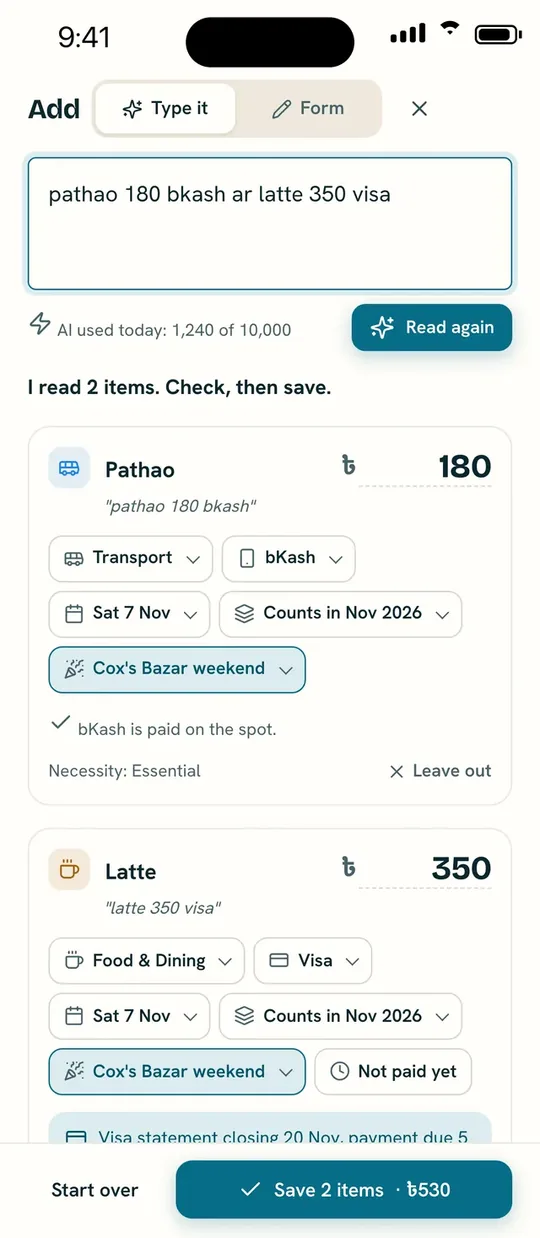
In Fin you type a spend the way you'd text a friend, for example "aj rickshaw 120 cash, bajar 2450 visa". That one line holds two expenses, two payment methods and two languages. Claude Haiku turns it into a list of expenses, each with fields like:
- amount
- category
- payment method (cash or a specific card)
- date
- a short note
It takes about 3 seconds and costs about US$0.0006 per entry.
Why structured output instead of free text?
Because the app has to act on it. A sentence like "you spent 120 on a rickshaw" is easy for a person to read and useless for a database. Fixed fields are:
- Checkable. The app can test every field: is the amount a positive number, is the category one that exists, is the card one you actually have.
- Predictable. The interface knows exactly what it will receive and can show it the same way every time.
- Cheap. A small, fast model is enough when the output shape is fixed. That's why this job runs on Haiku, not a larger model. I compared the two in Claude Haiku vs Sonnet in a live app.
How do you validate Claude's structured output?
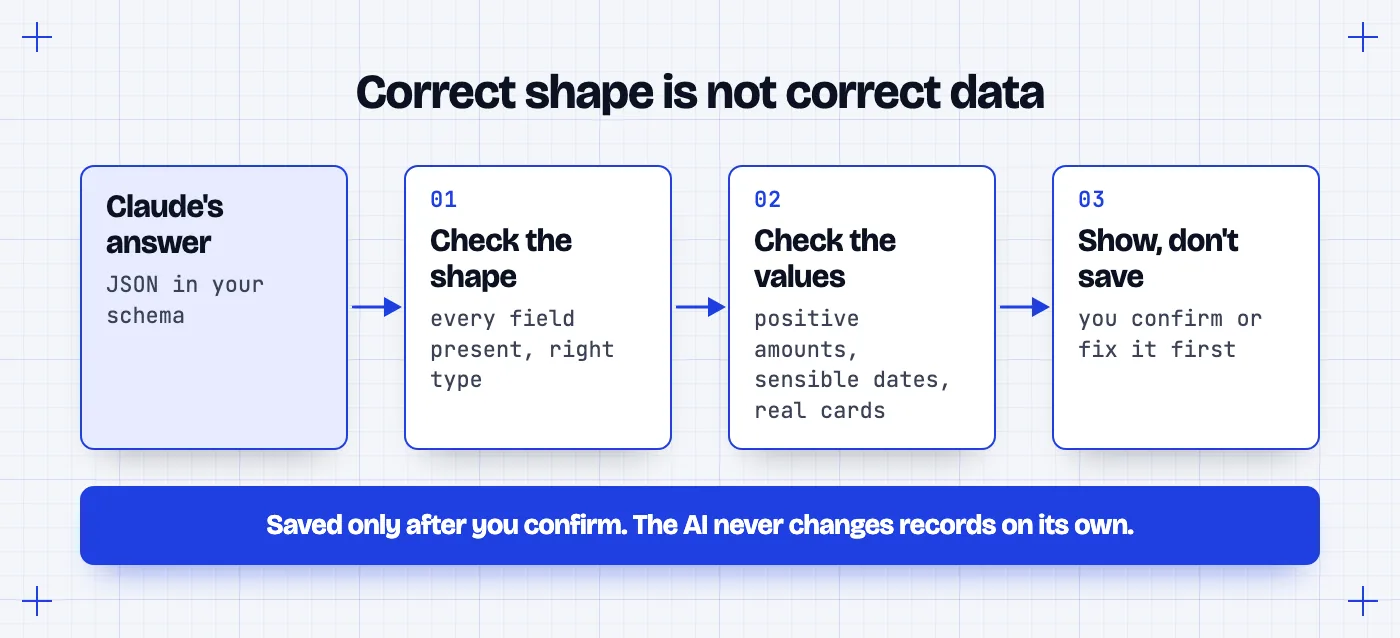
Treat it as input from outside, even though you asked for it. Fin's rule is that the shape being correct is not the same as the data being correct.
- Check the shape. Every required field is present and of the right type.
- Check the values. Amounts are positive, dates are sensible, categories and cards match what exists in the app.
- Show, don't save. The result appears as a proposal. You confirm it, or fix it, before it becomes a record. The AI never changes budgets or saved records on its own.
That third step does most of the work. Even a perfectly formatted answer can be wrong about which card you meant. A confirm step turns that into a quick correction instead of a bad record. It's also the strongest defense I know against tricky inputs, which I wrote about in prompt injection prevention.
What happens when the AI isn't available?
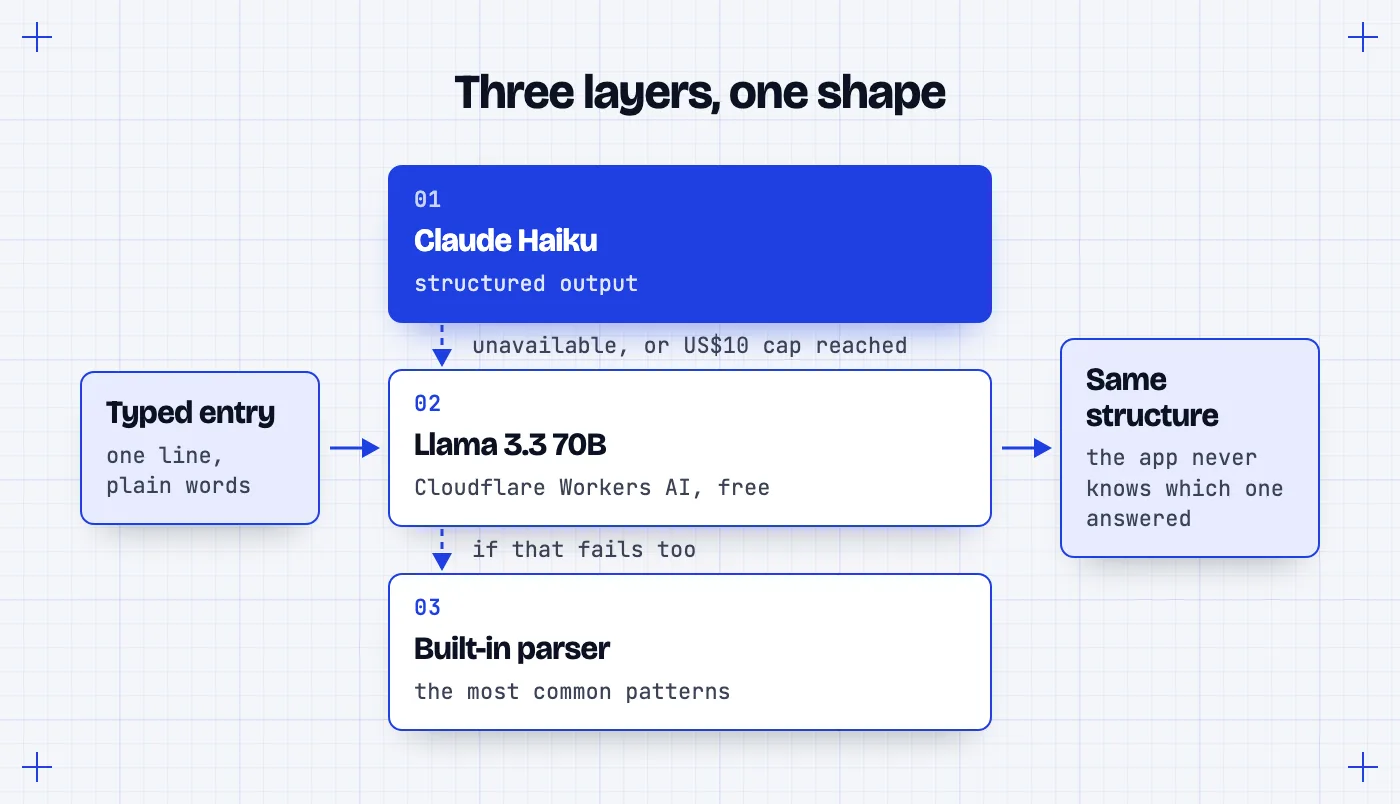
The feature still has to work. Fin reads a typed entry through three layers:
- Claude Haiku with structured output.
- Llama 3.3 70B on Cloudflare's free Workers AI, returning the same shape.
- A simple built-in parser for the most common patterns.
There's also a monthly cap of US$10 on the Claude API; when it's reached, Fin switches to the free model for the rest of the month. Because every layer returns the same structure, the rest of the app never knows which one answered.
Tips for your own structured output
- Keep the schema small. Only ask for fields the app will actually use.
- Use closed lists where you can. Categories and payment methods from your own data, not free text.
- Allow a list. One input can hold several items, as "rickshaw and bajar" does.
- Validate values, not just types. Correct JSON can still hold a wrong amount.
- Keep one shape across fallbacks. Then a backup model or parser can step in without changing the app.
- Put a person in front of anything saved. Propose, then confirm.
The same pattern works beyond finance: turning emails into tasks, messages into orders, notes into calendar events. Anywhere loose human text has to become clean data.
Adding an AI feature that has to turn messy input into data you can trust? Message me on WhatsApp and tell me what it reads.