 Shahria Emon
Cloudflare D1 is a SQLite database that runs next to your Workers, with no server to manage and a free plan that covers a surprising amount. I run two live apps on it: a Telegram news bot that writes thousands of rows a day, and a finance app where every number has to be right. Here is what D1 is good at, where it bites, and the habits that keep it fast.
What is Cloudflare D1?
D1 is Cloudflare's serverless SQL database, built on SQLite. You create it with Wrangler, bind it to a Worker, and query it with plain SQL. There is no connection pool to manage and no server to patch. On the free plan you get 5 million rows read and 100,000 rows written a day, plus 5 GB of storage across the account.
The two apps
- Tech News Notifier reads about 600 headlines a day, groups them into stories and sends alerts to Telegram. Its D1 database has 8 tables, built up through 5 migrations, and takes 4,000 to 8,500 row writes on a normal day.
- Fin is my personal finance app. Its server answers in 40 to 140 ms, and it works offline on the phone, then syncs to D1 when it reconnects.
What D1 is good at
Zero operations. Neither app has a database server. Backups are one command, wrangler d1 export, which writes the whole database to a SQL file.
Plain SQL and real migrations. Schema changes are numbered SQL files applied with Wrangler, the same in local development and in production. The news bot's 8 tables came together through 5 migrations without any manual fixes on the live database.
Fast enough for real apps. Fin's server responds in 40 to 140 ms, including its D1 queries. For a personal app or an early product, that is more than enough.
Honest local development. Wrangler runs D1 locally, so a full test suite can run against a real local database. The news bot's 104-check end-to-end suite does exactly that, with mock feeds and a mock Telegram.
Where D1 bites
Writes are the budget that matters. Reads are plentiful on the free plan. Writes are not: 100,000 a day, and an index adds more written rows. I learned this when my own stress test against production used about 92,000 of them in one go, and every write failed until midnight UTC. The full story is in what broke when two apps hit Cloudflare's free tier.
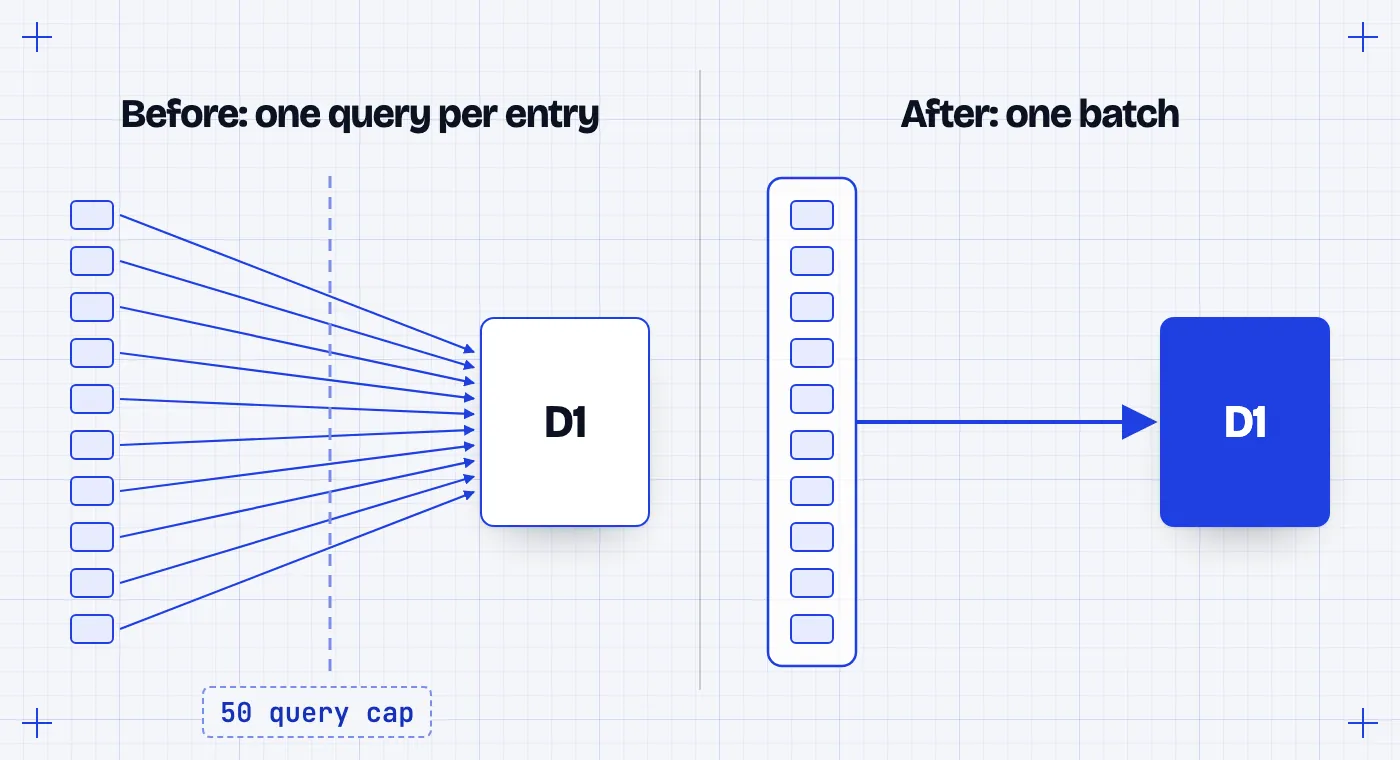
Queries per request are capped. On the free plan, one Worker request can run at most 50 D1 queries. Fin's first sync wrote each offline entry with its own query, and a busy day pushed one request past the cap.
The bill is per row, not per query. A query that scans a big table without an index counts every row it reads. Design indexes for the queries you actually run.
How do you write to D1 efficiently?
Count the writes per action, then cut them.
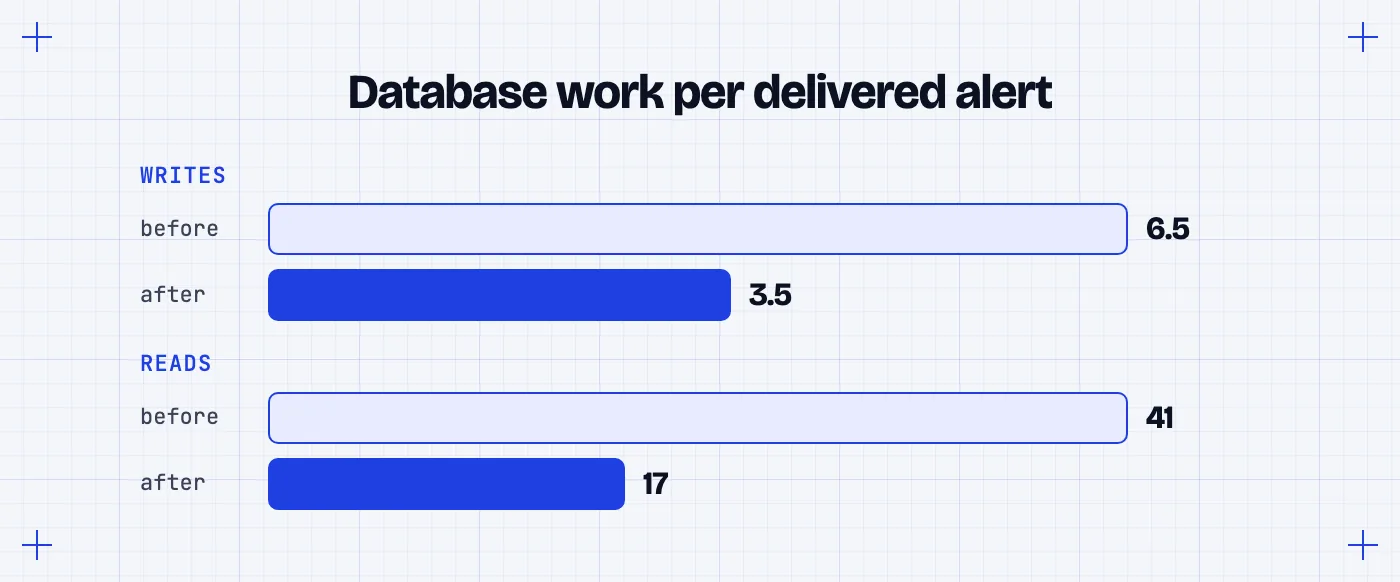
For the news bot, the unit that matters is one delivered alert. It started at 6.5 database writes and 41 reads per alert. After reworking what gets stored and when, it is 3.5 writes and 17 reads. Nearly half the writes for the same result.
For Fin, the fix was batching. Instead of one query per offline entry, a sync groups its statements and sends them together, so a sync costs a handful of queries however many entries it carries.
Can you trust D1 with data that has to be exact?
Yes, if you check. When Fin replaced my old expense tracker, the migration was checked month by month against the old app's totals. Every month matched, with 0 differences. That check, not the database, is what makes the numbers trustworthy. Any migration into D1 should end with a comparison like it.
How do you avoid running out of writes?
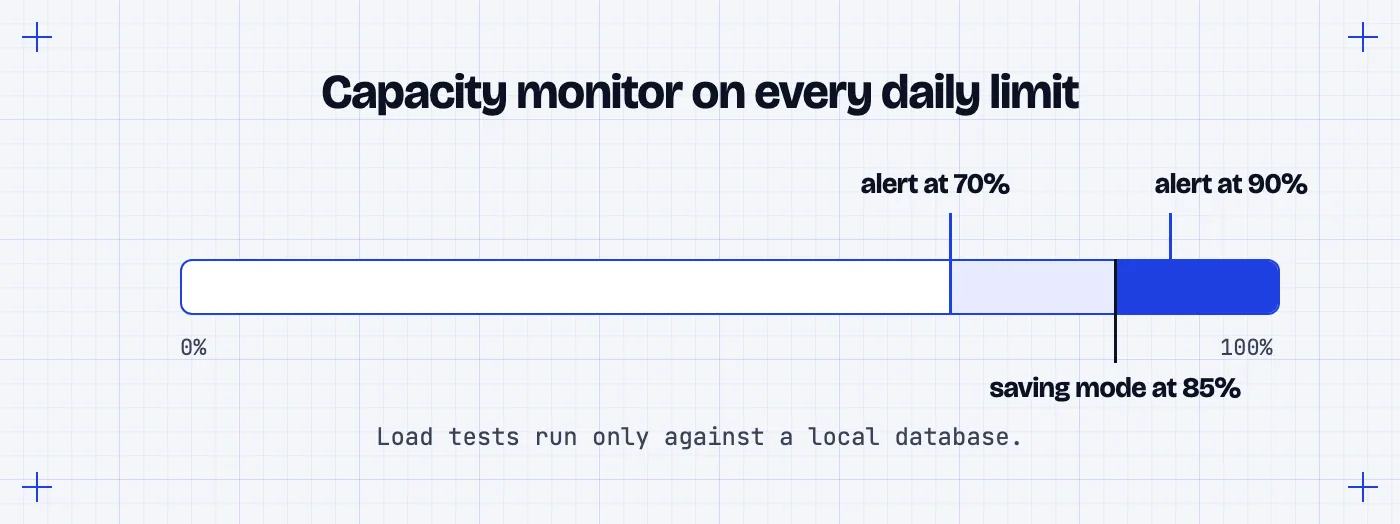
Watch your own usage before Cloudflare stops you. The news bot has a capacity monitor that alerts me at 70 and 90 percent of any daily limit, and switches the bot into a saving mode at 85 percent. Load tests now run only against a local database.
It hasn't fired since. On a normal day, both apps run comfortably below the line.
Is Cloudflare D1 production ready?
For apps like these, yes. Small to medium data, read-heavy traffic, a single region of writers, and a team that wants zero database operations. I'd think harder for write-heavy workloads at large scale, where the per-row write pricing and per-request limits shape the whole design.
My verdict: D1 is a good choice for a small production app in its early phase. Start there, watch your writes, and revisit when real growth arrives.
Both apps are AI-powered too. For how Fin splits its AI work between two models, see Claude Haiku vs Sonnet in a live app.
Deciding where your app's data should live? Message me on WhatsApp and tell me what it stores.